Book Appointment Now
Watch WWE Crown Jewel 2026 on IPTV: UK Start Times

You can watch WWE Crown Jewel 2026 on IPTV legitimately by using the authorised streaming service that holds the rights in your country, opened on an internet-connected TV, streaming stick, games console or phone. The show takes place in Riyadh on Saturday 7 November 2026, and the main card is advertised to begin at 5pm GMT in the UK and Ireland, which is midday on the US East Coast and the early hours of Sunday in Australia.
Where people come unstuck is the word itself. IPTV service only describes how the pictures reach your screen, over an internet connection rather than an aerial or satellite dish, and it says nothing about who is allowed to show the event. The rights holder’s own app is, technically speaking, an internet-delivered service, so the lawful route and the “IPTV” route aren’t two separate things. A generic subscription line from a panel that happens to list the event is a different matter entirely, and a polished setup page or a working login doesn’t make it licensed.
Start Times for 7 November, Country by Country
The clocks are kinder this year than they sometimes are. The UK returned to GMT on 25 October and the United States left daylight saving time on 1 November, so the usual five-hour gap between London and New York is back in place by the weekend of the show.
| Location | Local start (main card) | Day |
|---|---|---|
| UK and Ireland | 5pm GMT | Saturday |
| US and Canada (Eastern) | 12pm ET | Saturday |
| US and Canada (Pacific) | 9am PT | Saturday |
| Australia (Sydney, Melbourne) | 4am AEDT | Sunday |
| Australia (Perth) | 1am AWST | Sunday |
| New Zealand (Auckland) | 6am NZDT | Sunday |
These times follow the advertised start of the main card. Any pre-show coverage normally begins earlier, and big events have a habit of running long, so leave a margin at the other end of the evening too.
One more detail worth knowing: in late October, reports suggested the show would move to a different arena within Riyadh. The date and city stayed the same, and nothing indicates a change to broadcast times, but it’s sensible to confirm the listing inside your streaming app on the Friday rather than relying on an article written a week earlier, including this one.
What the Authorised Route Looks Like in Practice
In most English-speaking markets, including the UK, Ireland, Canada, Australia and New Zealand, the event is carried by the promotion’s international streaming partner as part of its regular subscription. Viewers in the United States watch through a separate sports streaming service, on a specific plan tier rather than its entry-level option. In both cases, check the plan page before Saturday instead of assuming your current tier covers live events, because services increasingly split live sport and entertainment into particular packages.
The practical upshot is that you won’t be typing a playlist URL or server address into a generic player. The authorised service uses its own app, which is available on most smart TVs, streaming sticks, consoles, phones, tablets and web browsers. If your television’s built-in app feels sluggish or outdated, a recent streaming stick plugged into the same TV usually runs a newer version of the app and handles live video more smoothly.

It also helps to recognise the offers that are not the authorised route. Adverts that use the event’s name or logo to sell cheap annual lines, promise “every pay-per-view included”, or take payment only through a messaging app are selling access the seller almost certainly has no right to provide. Beyond the legal question, these are exactly the services most likely to fail when demand peaks on a big night.
A Countdown to Watch WWE Crown Jewel 2026 on IPTV Without Last-Minute Panic
Most viewing problems on event nights aren’t caused by the service at all. They come from an expired card, an app that needs updating, a crowded home network or a household account already in use on too many screens. Spreading a few small checks across the week removes nearly all of that.
Earlier in the week
Sign in on the exact device you plan to use on Saturday, not just your phone. Install any pending app updates and TV firmware updates now, because a forced update at 4:55pm is a miserable way to start the evening. Confirm the subscription is active and the payment method on file hasn’t expired, and if you share the account with family, check the plan’s simultaneous-stream limit so nobody gets bumped off mid-show.
Friday evening
Play something long on the TV for twenty minutes or so and watch for stalls or drops in picture quality. If the TV or streaming stick can take a wired Ethernet connection, use one; if not, consider whether the router could sit closer to the screen for one night. Search for the event in the app so you know where its listing sits, and set a reminder if the app offers one.
Saturday, about an hour before
Restart your router and the streaming device, then leave them alone. Pause the bandwidth-hungry jobs elsewhere in the house: console game downloads, cloud photo backups and large file transfers are the usual culprits. Have the app signed in on a phone or tablet as a fallback screen.
If the picture stutters mid-show
Work through it in a sensible order. First, check whether the problem is yours or widespread by looking at the platform’s status updates or social channels, since a service-side issue won’t be fixed by anything you do at home. If it’s local, close and reopen the app before rebooting the whole device, then try your backup screen. Resist signing in and out repeatedly on several devices, as that can trip stream limits and lock you out for longer than the original fault.
Pro tip: If your app lets you set picture quality manually, dropping one step during a busy moment usually keeps the picture moving, and you can raise it again once things settle.
The UK Licence Rule That Catches Event Viewers Out
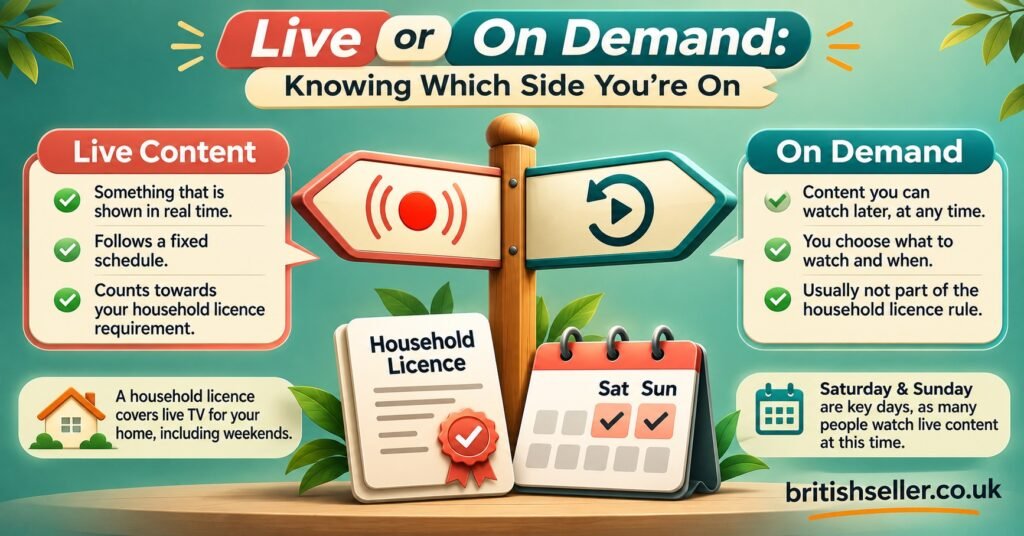
In the UK, a live event watched through a streaming app as it happens is treated the same way as live television. According to TV Licensing’s guidance on live TV and streaming, you need to be covered by a TV Licence to watch live on any streaming service, on any device, and a short delay created by your device doesn’t change that.
The distinction that matters is live versus on demand. Watching the replay on Sunday through the same streaming service is on-demand viewing, which doesn’t require a licence under the current rules for most streaming platforms. Plenty of households who only use subscription streaming assume they’re exempt, then sit down to a live event without realising it falls on the other side of the line.
Viewers outside the UK should check their own country’s rules, as broadcasting licence arrangements differ considerably between markets.
For UK IPTV Resellers: Event Weekends Test Honesty More Than Servers
If you run an IPTV reseller business, the run-up to a major live event brings a predictable question from customers: “Will it be on?” The straightforward answer is also the safest one. Point people to the authorised service in their country, and don’t advertise event names, logos or line-ups to sell subscriptions you hold no rights for. Using a promotion’s trademarks in marketing invites legal trouble quite apart from the copyright question, and a credit balance in an IPTV reseller panel is no evidence of distribution rights.
There’s still genuine value you can add. Event weekends compress support requests into a few hours, so it pays to prepare short, plain answers in advance for the problems that come up: app installation on different devices, Wi-Fi versus wired connections, clearing app caches, and what to do when a household hits its stream limit. Customers who receive calm, accurate help on a busy Saturday tend to remember it.
If you’re reviewing how you position your services more broadly, UK IPTV reseller panel services at British Seller is a useful starting point for thinking about the technology and support side of the business, kept separate from content claims.
Questions Worth Settling Before Saturday
Will I be able to watch it later if I miss the start?
Authorised platforms generally make major events available on demand after they finish, but timing varies by service and region. Check the listing in your app on Sunday morning, particularly if you’re in Australia or New Zealand and would rather not set a 1am or 4am alarm.
Does the reported venue change affect the start time?
Nothing announced so far suggests it does. The date and city are unchanged, and broadcast times are set around the schedule rather than the building. Confirm in your app on Friday to be certain.
Can I use a VPN to reach another country’s service?
Most streaming services prohibit this in their terms and actively block known VPN addresses, so it’s an unreliable plan for a live event even before considering the account risk. Use the service authorised where you live.
Will a standard IPTV player app show it from a playlist?
Not through any legitimate route. The authorised service streams through its own app, so a generic M3U or Xtream Codes player isn’t part of the picture.
Do I need a TV Licence if I only watch the replay on Sunday?
Under current UK guidance, on-demand viewing on most streaming services doesn’t require one. Watching live as the show happens does.
Before the Lights Go Up in Riyadh
The most reliable way to watch WWE Crown Jewel 2026 on IPTV is the least complicated one: the authorised streaming app for your country, a device you’ve already tested, and a household network that isn’t busy downloading something else at 5pm on Saturday. The time zone table covers when to sit down, the countdown covers the rest. If you’re in the UK and planning to watch live, make sure your TV Licence is in place; if you’d rather catch it on demand the next morning, the replay route works well too.