Book Appointment Now
IPTV Smarters Pro Setup UK: 8 Things Resellers Get Wrong in 2026
The Part Nobody Tells You About IPTV Smarters Pro Setup UK
Most people Googling “IPTV Smarters Pro setup UK” are looking for a four-step install guide and a working M3U link. That’s fine for a casual viewer. But if you’re reselling, managing 30, 50, 200 lines, the setup is only 10% of the job. The other 90% is what keeps customers from leaving.
This guide is written from the trenches. Not from a product page. Whether you’re setting up your first panel or troubleshooting buffer complaints at midnight, the details below matter.
What IPTV Smarters Pro Actually Does (And What It Doesn’t)
Before your customers even open the app, you need to understand what you’re working with. IPTV Smarters Pro is a player, not a provider. It reads streams, via Xtream Codes API or M3U playlist, and presents them inside a clean, cable-style interface. It does not generate content. It does not guarantee uptime. That’s your panel’s job.
For UK IPTV resellers, this distinction is critical. When a customer complains that “Smarters isn’t working,” nine times out of ten it’s a server-side issue, not the app. Knowing that difference saves you hours of pointless reinstalls.
The app supports Android, iOS, Firestick, Windows, macOS, and most Smart TVs. For the majority of UK households, a Firestick or Android TV box running IPTV Smarters Pro setup UK is the standard configuration. It’s what your customers are likely already using or can be guided to easily.
Pro Tip: Always recommend your customers download IPTV Smarters Pro from the official Google Play Store or Apple App Store, never from third-party APK mirrors. Modified APKs can strip credentials or introduce tracking software that creates serious security exposure for both the customer and your panel.
The Xtream Codes vs M3U Decision Affects Your Entire Panel
This is a reseller-level decision that gets skipped too often during IPTV Smarters Pro setup UK. You have two ways to authenticate customers: Xtream Codes API or M3U playlist URL.
Xtream Codes API is superior for resellers. Here’s why:
- Line management is centralized, you can expire, extend, or freeze a line from your panel dashboard without touching the customer’s device
- EPG data loads automatically alongside the stream package
- Connection limits are enforced at the server level, preventing credential sharing abuse
- Real-time analytics show active connections per line
M3U is simpler but gives you almost no control post-delivery. Once the URL is in the customer’s app, it’s effectively unsupervised. For small family setups it’s acceptable. For resellers managing more than 20 lines, M3U is a liability.
During IPTV Smarters Pro setup UK, always provision Xtream Codes credentials by default. Only fall back to M3U when the customer’s device genuinely doesn’t support the API login method.
Step-by-Step: Getting IPTV Smarters Pro Running on Firestick (Reseller-Optimised)
This isn’t a generic walkthrough. This is the version built for resellers who need to replicate it cleanly across dozens of customer devices.
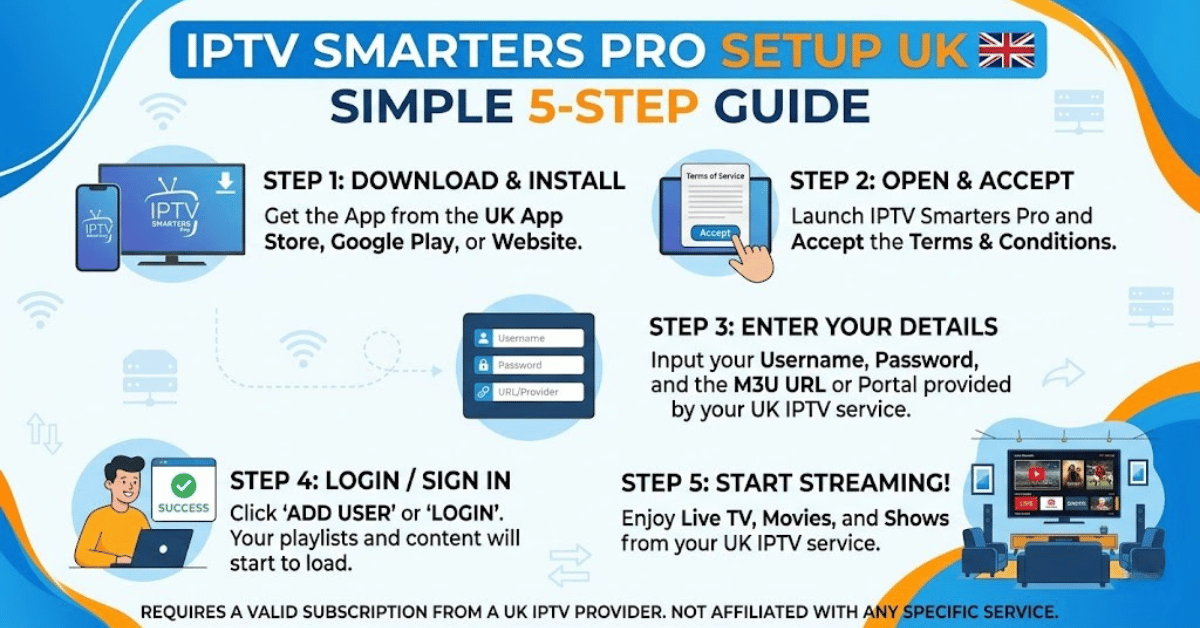
- Enable “Apps from Unknown Sources” under Firestick Settings → My Fire TV → Developer Options (only needed for sideloaded APKs; Play Store installs skip this)
- Download IPTV Smarters Pro via the Amazon Appstore search, or use the Downloader app with the official APK URL
- Launch the app and select “Add New User”
- Choose “Login with Xtream Codes API”
- Enter the server URL, username, and password exactly as provided by your panel, no trailing slashes, no spaces
- Tap “Add User” and allow the channel list to fully populate before navigating
- Set preferred video player to the built-in player first; switch to external (VLC or MX Player) only if codec issues appear
- Configure EPG by navigating to Settings → EPG and verifying the guide is auto-loading from your panel’s EPG feed
For families with multiple devices, repeat this process per device. IPTV Smarters Pro setup UK scales cleanly across devices using the same credentials, just ensure your panel credits allow multi-connection lines.
Why ISP Interference Is Now the Biggest Setup Variable in the UK
In 2026, a technically perfect IPTV Smarters Pro setup UK can still fail, not because of your server, not because of the app, but because of the pipe the data travels through.
UK ISPs have significantly expanded their deep packet inspection (DPI) capabilities over the past 18 months. DNS poisoning has become a routine enforcement tool, silently redirecting stream requests before they ever reach your server. Customers see buffering. They blame you. But the failure happens upstream.
Here’s how to tell the difference:
| Issue | Likely cause | Resolution |
|---|---|---|
| Sudden buffering spike (all channels) | ISP-level DPI throttling | VPN or DNS change |
| Specific channels only buffering | CDN routing issue | Backup uplink server switch |
| App loads but channels won’t play | DNS poisoning | Change to 1.1.1.1 or 8.8.8.8 |
| Random disconnects during live events | HLS latency from overloaded node | Panel server load balancing |
| Xtream Codes login fails intermittently | Server-side timeout or IP block | Rotate server URL to backup |
The practical fix for most UK customers during IPTV Smarters Pro setup UK: change the device DNS to Cloudflare (1.1.1.1) or Google (8.8.8.8) before even entering credentials. This alone resolves roughly 30-40% of “setup issues” that are actually routing issues.
How Load Balancing Makes or Breaks Your Reseller Reputation
You can do everything right during IPTV Smarters Pro setup UK and still lose customers if your panel provider hasn’t handled infrastructure properly. This is where most low-cost panels silently fail.
Load balancing distributes active streams across multiple server nodes. Without it, a popular football match, a League final, a heavyweight boxing event, creates a demand spike that one server cannot absorb. The result: simultaneous buffering complaints from your entire customer base at the worst possible moment.
Premium UK reseller panels like those from britishseller.co.uk operate with multi-server failover architecture, switching between nodes in under three seconds if a primary server goes down. That’s not a feature, it’s a survival requirement for any reseller trying to retain customers long-term.
Pro Tip: Ask your panel provider how many backup uplink servers are active during peak hours, not just how many exist in total. A provider with three backup servers that are only active during emergencies is not the same as one running active load distribution across all three simultaneously.
EPG Configuration: The Most Ignored Part of IPTV Smarters Pro Setup UK
Electronic Program Guide accuracy is a quiet customer retention factor. Most UK IPTV resellers focus on stream quality and completely ignore EPG, until customers start complaining that the guide shows wrong programs, or shows nothing at all.
Within IPTV Smarters Pro setup UK, EPG is configured under Settings. Your panel provider supplies the EPG URL. The common mistakes:
- Entering the URL and not refreshing the playlist, EPG won’t populate until a full reload
- Using an EPG source from a different provider than the stream source (mismatched channel IDs)
- Not setting the EPG timezone correctly for UK time (GMT/BST), causing schedule offset by one hour during summer
A properly configured EPG showing accurate UK listings is a visible quality signal. Customers who can browse upcoming programming like a traditional TV guide are significantly less likely to churn, even if stream quality is occasionally imperfect.
For resellers managing family subscriptions, EPG accuracy is often the deciding factor in whether a non-technical user feels comfortable with the service long-term.
Managing Panel Credits While You Roll Out New Lines
Every new line you activate during IPTV Smarters Pro setup UK costs a credit. For UK resellers working with britishseller.co.uk’s model (credits at approximately £1.50 each), credit discipline matters.
Common credit management errors:
- Activating lines for customers before payment confirmation (creates unrecoverable losses if customer ghosts)
- Running single-connection lines for households that need two or three simultaneous streams
- Forgetting to expire trial lines, which burn credits silently in the background
- Over-provisioning new resellers under your panel before they’ve demonstrated consistent sales volume
A clean credit audit every 30 days, checking active vs. inactive lines, is basic hygiene that most beginner IPTV UK Panel resellers skip entirely. Panels with no credit expiry (such as britishseller.co.uk’s structure) give you flexibility, but that flexibility still requires discipline in activation and deactivation.
Pro Tip: Create a simple tracking sheet, customer name, activation date, renewal date, credit count. Even a basic spreadsheet prevents the “I don’t know who’s still active” problem that silently erodes margins over time.
Android TV vs Smart TV: How the Setup Process Differs
The setup process is similar across devices, but the failure points are different. For Android TV boxes and Firestick, the main risk is outdated firmware causing codec conflicts with HLS streams, particularly on 4K content. Ensure the device is fully updated before setup.
For Samsung and LG Smart TVs, the IPTV Smarters Pro app may not be directly available through the native app store. In those cases, the path forward is sideloading via USB or connecting through an Android TV box as an intermediary. Attempting to run M3U streams directly through the Samsung IPTV app without Smarters is possible but gives you almost no stream control or quality adjustment options.
On iOS, IPTV Smarters Pro is available through the App Store directly. The setup mirrors the Android process: Add User → Xtream Codes API → enter credentials. iOS users should note that the app does not support background play by default, it pauses when the screen locks.
The Reseller Checklist: After IPTV Smarters Pro Setup UK Is Complete
This is the section most “setup guides” skip. The app being installed is not the finish line.
Execution-focused post-setup checklist:
- Confirm Xtream Codes API credentials are saved correctly and test with a live channel before handing over to customer
- Verify EPG is loading and timezone is set to UK time
- Test channel switching speed, anything above 8 to 10 seconds indicates server latency issues requiring investigation
- Confirm multi-connection is provisioned correctly if the household uses more than one device simultaneously
- Change DNS on the customer’s router or device to Cloudflare (1.1.1.1) to pre-empt ISP interference
- Document the customer’s server URL so you can quickly swap to a backup if the primary goes down
- Confirm your panel has at least one backup uplink server available, and test that you can activate it remotely
- Set a calendar reminder for line renewal 5 days before expiry, never let a paying customer lapse on your end
A clean IPTV Smarters Pro setup UK is the entry point. Customer retention is the real business. Every step above reduces churn without requiring a single extra sales call.