Book Appointment Now
IPTV HLS Stream Delivery: The Reseller’s Field Manual for 2026
The Silent Exit
Somewhere right now, a reseller is watching their subscriber count bleed out, not because their content library is weak, not because their pricing is off, but because an IPTV HLS stream segment timed out six seconds ago and the viewer already closed the app.
That’s how fast this industry punishes you. Not with lawsuits or takedowns. With a silent exit. A subscriber who simply never comes back.
I’ve been on both sides of that moment. I’ve stared at server logs at 2 AM watching segment timeout errors cascade across three uplink nodes while my resellers flooded the support channel asking what happened. The answer was almost always the same, the IPTV HLS stream delivery chain had a weak link nobody bothered to stress-test.
This article isn’t a glossary of streaming terms. It’s what I learned after losing subscribers, switching providers, rebuilding infrastructure, and learning that HLS delivery is the invisible backbone that either makes or breaks your entire UK IPTV reseller operation.
How IPTV HLS Stream Delivery Actually Works Behind Your Panel
Most UK IPTV resellers interact with IPTV through a panel. Credits in, lines out. But between that panel click and a viewer’s screen, a complex delivery pipeline runs, and the IPTV HLS stream protocol sits at its core.
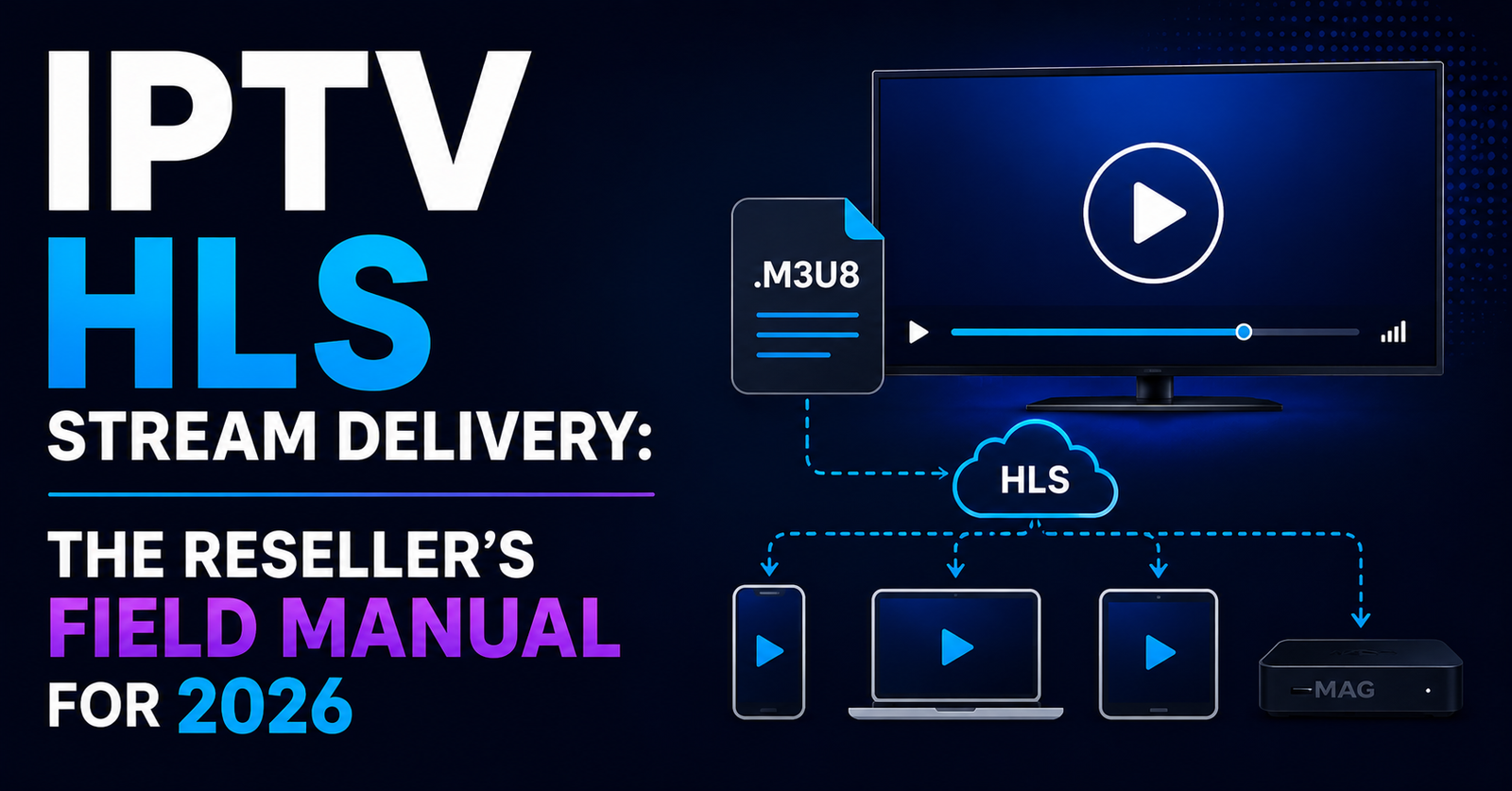
HLS, HTTP Live Streaming, works by chopping a live video feed into small segments, typically 2 to 10 seconds each. A manifest file (.m3u8) tells the player which segment to fetch next. The player downloads each segment sequentially, buffers it, and plays it back.
Simple in theory. Brutal in practice.
Pro Tip: If your provider’s default segment duration is above 6 seconds, you’re already stacking latency before a single viewer even presses play. Shorter segments (2 to 4 seconds) reduce delay but demand faster server response. It’s a trade-off most panel providers never discuss with resellers.
When a segment fails to arrive within the player’s timeout window, you get a freeze, a buffer wheel, or a full crash. That’s the segment timeout error, and it’s the single most common IPTV HLS stream failure point in live content delivery.
Bandwidth Saturation: The Silent Killer Nobody Blames First
Here’s what actually happens 80% of the time when resellers report buffering to me. It isn’t a codec issue. It isn’t a DNS problem. It’s bandwidth saturation on the delivery node.
Every server has a ceiling. When concurrent connections push total throughput past that ceiling, the server starts queuing segment requests. Queued requests mean delayed segments. Delayed segments mean buffering. Buffering means your subscriber opens a competing app.
The maths is straightforward but resellers rarely do it. A single 1080p IPTV HLS stream typically requires 5 to 8 Mbps. A server with 1 Gbps capacity can theoretically handle 125 to 200 concurrent streams. In practice, overhead, OS-level processes, and burst traffic cut that number by 30 to 40%.
So that “unlimited connections” promise from a cheap provider? It’s a lie wrapped in marketing language.
Here’s how budget and premium infrastructure actually compare:
[TABLE 1 HERE]
If you’re running a reseller operation and your provider can’t tell you exactly how many concurrent IPTV HLS stream connections each node supports before degradation, find a new provider.
The Bitrate Trap That Catches Every New Reseller
New resellers ask me the same question constantly: “Can I offer 4K streams?” And my answer is always the same, can your infrastructure actually sustain the bitrate?
There’s a fundamental misunderstanding in this industry. Beginners treat bitrate as a quality badge. Higher number, better picture, more subscribers. But bitrate without stability is a buffering machine.
A 15 Mbps 4K IPTV HLS stream looks incredible when it works. When the delivery chain can’t sustain that throughput consistently, and it often can’t during peak evening hours, the adaptive bitrate algorithm kicks in and drops the viewer to 720p or lower. That jarring quality switch mid-match is worse than just offering a stable 1080p stream from the start.
Pro Tip: Stability at a lower bitrate always beats instability at a higher one. Configure your panels to default to 1080p with adaptive fallback rather than advertising 4K that your infrastructure can’t consistently deliver. Your churn rate will thank you.
The real skill isn’t offering the highest resolution. It’s matching your IPTV HLS stream bitrate to what your delivery network can actually sustain under real-world conditions, not lab conditions, not off-peak testing, but Saturday evening when every subscriber is watching simultaneously.
ISP-Level AI Detection: What Changed in 2026
Two years ago, ISP blocking was relatively predictable. DNS-level blocks, some basic deep packet inspection, the occasional port block. You could work around most of it with a decent DNS configuration and basic obfuscation.
2026 is a different landscape entirely.
Major ISPs have deployed AI-driven traffic analysis that doesn’t just look at packet headers, it analyses traffic patterns. An IPTV HLS stream has a distinctive fingerprint: regular interval GET requests for .ts segments, predictable payload sizes, consistent connection durations during known broadcast times.
These AI models flag that pattern even when the traffic is encrypted. They’re not reading your content. They’re reading your behaviour.
Consistent segment requests every 4 to 6 seconds over HTTPS, traffic spikes correlating with major broadcast schedules, and persistent connections to specific IP ranges known for media delivery are all signals these systems pick up on.
Pro Tip: Rotating your CDN endpoints and varying segment request intervals, even slightly, can reduce AI pattern-matching accuracy. Some advanced providers now offer jittered segment delivery specifically to counter this. Ask your provider if they support it. If they don’t know what you’re talking about, that tells you everything.
This is why backup uplink servers have become non-negotiable. When a primary delivery IP gets flagged or throttled, your IPTV HLS stream needs an automatic failover path that doesn’t share the same subnet or geographic fingerprint as the blocked node.
Panel Credit Economics and Why Margins Collapse
Let’s talk about something most IPTV articles avoid entirely, the credit model and how it interacts with HLS delivery costs.
Resellers buy panel credits. Each credit generates a subscription line. The margin between what a reseller pays per credit and what they charge the subscriber is the entire business model.
But here’s the part nobody explains: your cost per credit is directly tied to the infrastructure behind the IPTV HLS stream delivery. Cheap credits mean the provider is cutting costs somewhere, usually on server capacity, uplink redundancy, or CDN quality.
When that provider’s infrastructure buckles during peak hours, your subscribers complain, you issue refunds or extensions, your effective margin drops, churn accelerates, and you buy more credits to replace lost subscribers.
That cycle is how most resellers slowly bleed out. They optimised for credit price instead of stream reliability.
The operators who survive long-term understand that paying 15 to 20% more per credit for premium IPTV HLS stream infrastructure isn’t a cost increase, it’s churn insurance.
Load Balancing Mistakes That Crash Live Events
Live events are the stress test that exposes every infrastructure weakness. A League matchday or a major boxing card doesn’t gradually ramp up, it spikes. Thousands of concurrent connections hit within minutes.
Most budget IPTV HLS stream providers use basic round-robin load balancing. Server A gets request 1, Server B gets request 2, Server C gets request 3, repeat. Simple and completely inadequate for live event traffic.
Why? Because round-robin doesn’t account for current server load. Server A might already be at 90% capacity while Server B sits at 30%. Round-robin sends the next request to A anyway.
Intelligent load balancing for IPTV HLS stream delivery requires real-time server health monitoring, weighted distribution based on current capacity, geographic routing to reduce latency, and automatic node exclusion when performance drops below threshold.
Pro Tip: Before committing to any provider, ask them what happens to your streams during a major live event with 50,000+ concurrent viewers across their network. If the answer is vague, the infrastructure is vague too.
The providers who handle live events well aren’t using magic. They’re using properly configured load balancers with health-check intervals under 5 seconds and pre-warmed CDN nodes in key geographic regions.
DNS Poisoning and HLS Manifest Hijacking
A growing threat in 2026 that resellers rarely discuss is DNS poisoning targeting IPTV HLS stream manifest files. The .m3u8 manifest is the roadmap for the entire stream. If an attacker or ISP-level filter redirects the DNS resolution for your manifest URL, the stream doesn’t just fail, it can redirect to a warning page or simply return nothing.
This isn’t theoretical. It’s happening regularly in the UK and EU markets.
The defence layer requires encrypted DNS (DoH or DoT) at the server level, manifest URL rotation on short TTLs, HTTPS-only delivery with certificate pinning where possible, and monitoring for unexpected manifest response sizes.
A legitimate .m3u8 file for an IPTV HLS stream is typically a few kilobytes. If your monitoring detects manifest responses at 50KB+ or with HTML content-type headers, something has been intercepted.
Customer Churn Psychology: What Subscribers Actually Tolerate
Here’s an uncomfortable truth from running IPTV operations for years. Subscribers don’t leave because of one bad stream. They leave because of unpredictable bad streams.
A subscriber who experiences buffering every Saturday at 8 PM will tolerate it, grudgingly, because they can predict it. A subscriber who gets random IPTV HLS stream failures on Tuesday afternoon, then perfect quality Thursday evening, then a crash Friday night will leave. The inconsistency breaks trust faster than consistent mediocrity.
This means your monitoring priority shouldn’t just be uptime percentage. It should be consistency metrics. The table below shows what to track:
| Factor | Budget infrastructure | Premium infrastructure |
|---|---|---|
| Bandwidth per node | 1 Gbps shared | 10 Gbps dedicated |
| Segment timeout rate | 8–15% under load | Under 1% |
| Failover nodes | None | 2–3 automatic |
| Peak-hour degradation | Severe | Minimal |
| Uplink redundancy | Single source | Multi-source with backup |
Pro Tip: Track your refund requests by day and time. Cluster patterns will reveal exactly when your infrastructure is weakest, and that’s where you focus your upgrade budget first.
Scaling Without Destroying What Already Works
The hardest phase in any IPTV UK reseller operation is scaling from 200 subscribers to 2,000. Not because the technology changes dramatically, but because the mistakes you got away with at 200 become catastrophic at 2,000.
At small scale, a single-server IPTV HLS stream setup with basic load handling works fine. You might never notice segment timeout errors because your concurrent viewer count never pushes past the server’s comfort zone.
At scale, everything compounds. Every 0.5% segment failure rate that was invisible at 200 connections becomes 10 angry subscribers per hour at 2,000 connections. Every DNS resolution delay that added 200ms at low traffic adds 2 seconds under heavy load because the resolver queue backs up.
The operators who scale successfully do three things. They upgrade infrastructure before demand forces them to, not after. They maintain at least two independent uplink sources for every IPTV HLS stream category. And they monitor HLS latency at the edge, not just at the server.
Scaling is where cheap credits come back to haunt you. The provider who was “good enough” at 200 subscribers often can’t sustain quality at 2,000 because their own infrastructure was never built for that density.
Frequently Asked Questions
What causes IPTV HLS stream buffering during peak hours?
Bandwidth saturation on delivery nodes is the primary cause. When concurrent connections exceed a server’s actual throughput capacity, not the advertised capacity, segment delivery slows down, creating buffering. Premium providers allocate dedicated bandwidth per node and use intelligent load balancing to distribute peak-hour traffic across multiple servers.
How do segment timeout errors affect IPTV HLS stream quality?
When an HLS player requests a video segment and the server doesn’t deliver it within the timeout window, the player either freezes, shows a loading spinner, or crashes entirely. Frequent segment timeouts indicate server-side delivery problems, usually overloaded nodes or insufficient uplink bandwidth, rather than issues on the viewer’s end.
Can a VPN fix IPTV HLS stream issues caused by ISP throttling?
A VPN can bypass basic ISP blocks and DNS-level filtering, but it won’t help if the underlying IPTV infrastructure itself is overloaded. In 2026, AI-driven ISP detection can also identify VPN traffic patterns, making this less reliable than it was previously. The better long-term solution is a provider with built-in obfuscation and endpoint rotation.
Why does my IPTV HLS stream look fine in testing but buffer for subscribers?
Testing typically happens off-peak with minimal concurrent connections. Real-world conditions involve hundreds or thousands of simultaneous viewers, ISP-level interference, and varying subscriber internet quality. Always stress-test with simulated concurrent loads, not single-connection checks.
How many concurrent IPTV HLS stream connections can a single server handle?
It depends on bitrate and server specifications, but a typical 1 Gbps server handles roughly 80 to 140 stable 1080p streams after accounting for overhead. Providers advertising “unlimited” connections on shared infrastructure are overselling capacity, which directly causes peak-hour quality drops.
Is it worth paying more for premium IPTV HLS stream infrastructure as a reseller?
Absolutely. The cost difference between budget and premium credits is typically 15 to 20%, but subscriber retention rates on premium infrastructure can be 30 to 50% higher. Lower churn means fewer replacement credits purchased, making the higher per-credit cost a net saving over any six-month period.
What is HLS latency and why does it matter for live IPTV content?
HLS latency is the delay between the live broadcast moment and when the viewer sees it. Standard HLS adds 15 to 30 seconds of delay due to segment buffering. For live sports or events, reducing segment duration and using low-latency HLS configurations can cut this to 3 to 5 seconds, though it demands faster server response times.
How do I know if my IPTV HLS stream provider uses proper load balancing?
Ask them directly what happens during a major live event with high concurrent viewership. If they can explain their health-check intervals, failover logic, and geographic routing, they’re likely using intelligent load balancing. If the answer is vague or they mention round-robin only, the infrastructure probably can’t handle serious traffic spikes.
Reseller Execution Checklist
- Audit your current provider’s actual per-node concurrent connection limit, not their marketing number
- Test IPTV HLS stream segment delivery times during peak hours, not off-peak
- Confirm your provider uses intelligent load balancing with health checks under 5 seconds
- Verify at least two independent uplink sources exist for your primary content categories
- Implement encrypted DNS at every level of your delivery chain
- Monitor segment success rate variance weekly, consistency matters more than averages
- Set your default stream output to stable 1080p rather than unreliable 4K
- Map your refund request patterns to identify infrastructure weak points by time and day
- Budget for infrastructure upgrades at 70% capacity, not after failures begin
- Build your UK IPTV reseller operation on reliability-first economics, explore credit structures at British Seller that prioritise infrastructure quality over volume discounting