Book Appointment Now
What is an IPTV Reseller Panel? Your 2026 Guide to Profits and Control
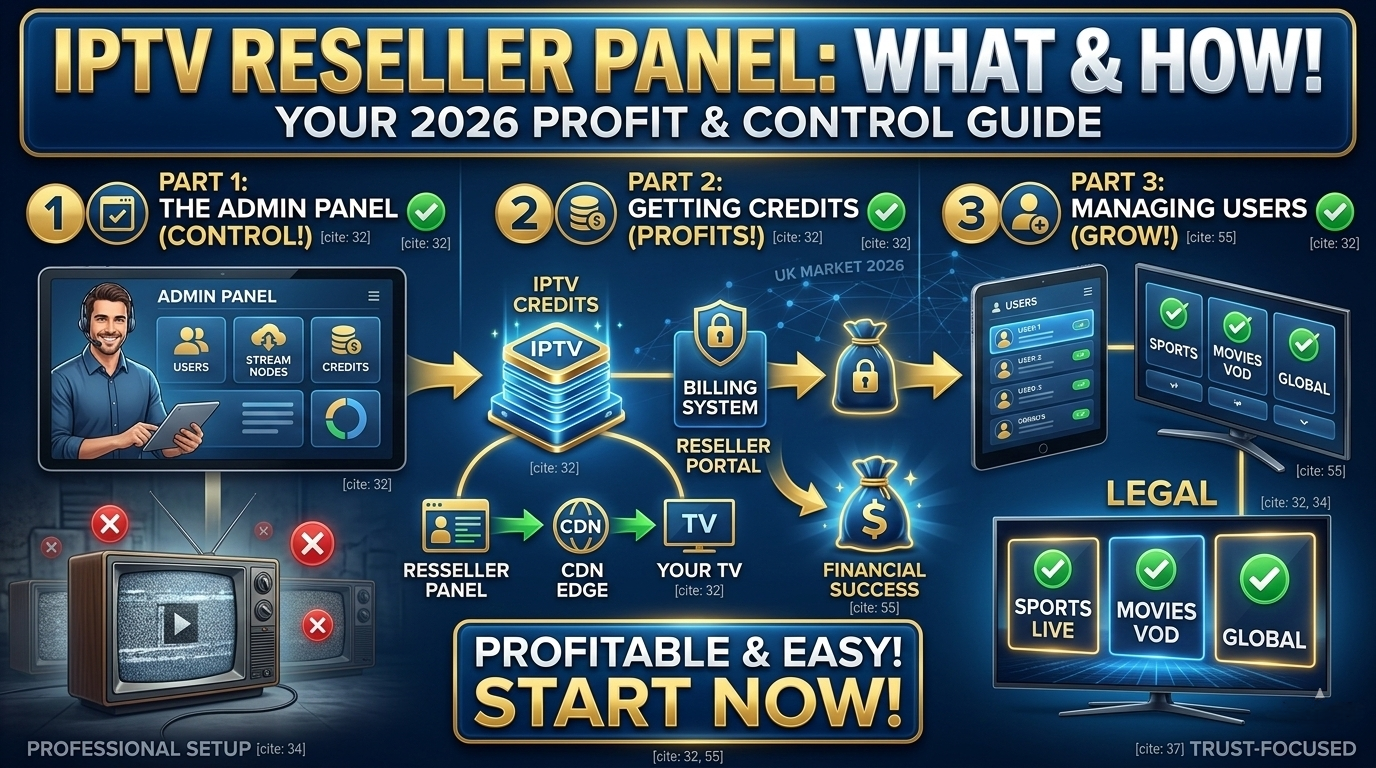
If you’re looking at the IPTV reseller business and wondering how operators manage hundreds of subscribers without any technical background, the answer almost always comes down to one tool: the IPTV reseller panel.
It’s the control interface that sits between you as an operator and the subscribers you serve. Account creation, plan configuration, credit management, renewal tracking, all of it happens from a single browser-based dashboard. No servers to maintain. No streaming infrastructure to manage. Just a web-based control room that handles the business layer while your provider handles everything technical underneath.
This guide explains what an IPTV reseller panel actually is, how the credit system works in practice, what features separate a genuinely useful panel from a frustrating one, and how to run daily operations without getting buried in admin. If you’re evaluating whether this business model is right for you, this is the place to start.
What an IPTV Reseller Panel Actually Does
An IPTV reseller panel is a web-based software system provided by an IPTV infrastructure company. It gives you, the operator, full control over subscriber accounts without any access to the underlying servers, encoding systems, or streaming delivery infrastructure. That side of things is entirely the provider’s responsibility.
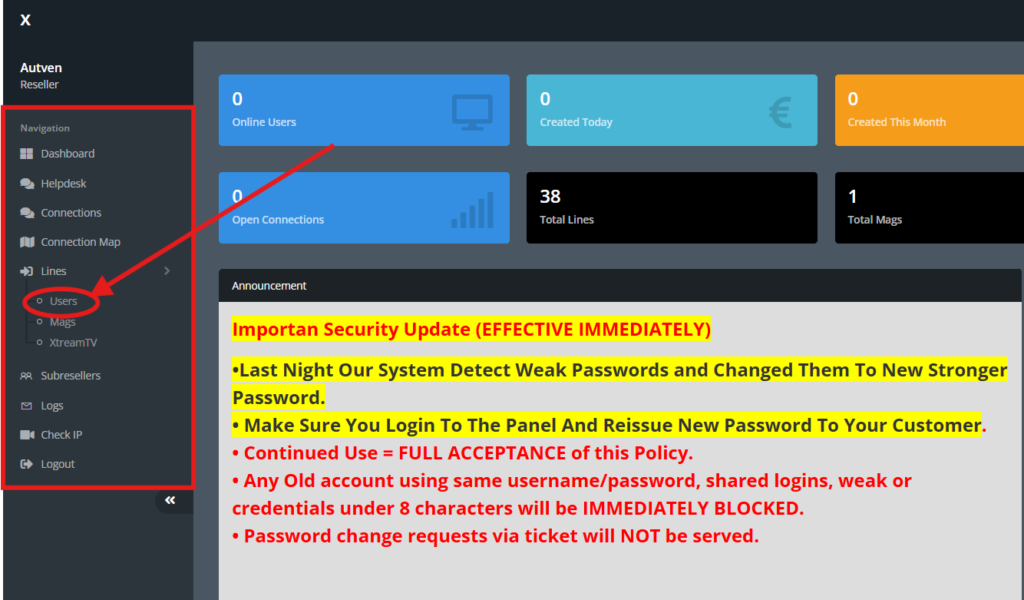
Think of it as a management console. The streaming infrastructure runs in the background, maintained and managed by your provider. The panel is your interface to that infrastructure. Everything you do to run your subscriber-facing business, creating accounts, setting plan durations, tracking renewals, suspending inactive subscriptions, monitoring active sessions, happens through the panel.
Most IPTV reseller panels run entirely in a web browser. Nothing to install. You log in with your credentials and the entire subscriber management system is immediately accessible.
The first time I logged into a panel, I expected something complicated. What I actually found was closer to a CRM than anything technical, rows of subscriber accounts, a credit balance displayed in the top corner, and a handful of configuration menus down the left sidebar. The learning curve is genuinely shallow. Two sessions in, it felt routine.
Who Uses an IPTV Reseller Panel and Why
The IPTV reseller panel is used by operators who purchase wholesale access from an infrastructure provider and sell retail subscriptions to end users. The reseller doesn’t manage servers, encode streams, or touch the technical delivery layer at all. That’s the provider’s obligation.
The reseller’s role is entirely the customer-facing business layer: acquiring subscribers, managing their accounts, setting pricing, collecting payments, and providing support. The panel is the tool that makes all of that manageable at scale, and without it, even a 30-subscriber operation becomes difficult to run consistently.
If you’re still building your understanding of how the overall business structure works, where the reseller sits relative to the provider and the subscriber, getting clarity on the IPTV reseller role first will give you useful context for everything the panel does.
How the Credit System Works in an IPTV Reseller Panel
The credit system is the financial engine of the reseller panel. Understanding it clearly before you spend anything on panel access is worth the time, because misunderstanding it is one of the most common early mistakes new operators make.
When you sign up with an IPTV provider as a reseller, you purchase a block of credits. Those credits sit in your panel balance. Each time you create a subscriber account or renew an existing one, credits are deducted from your balance according to the plan duration and the number of simultaneous connections included.
A one-month single-connection account might cost one credit. A three-month dual-connection account might cost six. The exact credit values depend on your provider’s specific pricing structure.
The first time I set this up, I ran a few test accounts before touching the main credit balance, just to confirm I understood exactly what was being deducted and when. Took about ten minutes. It saved me from a confusing situation later when a subscriber wanted an unusual plan duration and I wasn’t sure what the credit cost would be before committing.
| Credit scenario | How credits are used | Operator action required |
|---|---|---|
| New subscriber, 1 month | 1 credit deducted per connection per month | Create account, assign plan, deduct credit |
| Subscriber renewal, 3 months | 3 credits deducted at renewal | Renew via panel, collect payment from subscriber |
| Trial account issued | Partial or short-duration credit deducted | Create trial, monitor conversion, follow up before expiry |
| Subscriber paused | No credits deducted during suspension | Suspend account, retain credit, resume when subscriber returns |
| Subscriber cancelled | No further credits deducted after deletion | Delete or archive account, recover unused credits if applicable |
| Credit balance low | System may alert below a threshold | Top up credits before accounts begin expiring |
Why the Credit Model Works in Your Favour
The credit model gives you direct control over spending. You only spend credits when you activate subscriber accounts. You don’t pay for idle capacity or unused connections. If a subscriber cancels, you stop spending credits on that account immediately.
You can also purchase credits in advance at a wholesale rate that decreases per unit at higher volumes. The more you buy upfront, the lower your cost per subscriber, which increases your gross margin on each retail subscription you sell.
The practical implication for new operators: start with a modest credit purchase until you’ve confirmed the business is working. Buying a large block to get a better per-unit rate makes financial sense once your subscriber base is stable. Buying large before you have your first subscriber puts capital at risk without a confirmed return.
Core Features of a Well-Built IPTV Reseller Panel
Not all panels are equal. The features available to you as a reseller vary significantly between providers. Knowing what a strong panel should offer helps you evaluate options before committing, and avoid discovering gaps after you’ve already onboarded subscribers.
| Panel feature | What it does | Why it matters |
|---|---|---|
| Credit System | Stores prepaid units that convert to subscriber access time | Controls spending and lets you scale at your own pace |
| Subscriber Management | Create, edit, suspend, and delete accounts | Full control over who has access and for how long |
| Plan Configuration | Build named tiers with set durations, connections, and pricing | Offer multiple options without any technical setup |
| Renewal Tracking | Shows active, expiring, and expired accounts in one view | Prevents passive churn from forgotten renewals |
| Branding Controls | Display your own business name in subscriber-facing elements | Builds brand identity independent of the provider |
| Connection Limits | Set simultaneous streams per subscriber account | Prevents account sharing that erodes per-subscriber revenue |
| Trial Account Creation | Issue short-duration test accounts to prospects | Converts interested leads without requiring upfront payment |
| Usage Monitoring | View active sessions and connection status per account | Identify issues before subscribers report them |
| Bulk Operations | Renew, suspend, or modify multiple accounts at once | Saves significant time as subscriber count grows |
When comparing providers, run through this list methodically. A panel missing three or four of these capabilities creates operational gaps that become increasingly costly to work around as your subscriber count grows.
Setting Up Your IPTV Reseller Panel: What the Process Actually Looks Like
The setup process for a reseller panel is designed to be straightforward. Most providers have you operational within a single session. Here’s what the typical sequence looks like in practice, including the friction points that aren’t usually mentioned in the official guides.
Step 1: Access and Initial Configuration
Once your account is created and your initial credit purchase is confirmed, you receive login credentials for your panel. Log in through the web interface your provider supplies. The first thing to configure is your basic business information, the name and branding that appears in subscriber-facing elements.
This took me about ten to fifteen minutes on first setup. Nothing technically complicated, it’s closer to filling out a settings page. One thing that caught me off: the branding settings on some panels are buried in a sub-menu rather than appearing in the main settings area. If you can’t find them immediately, look for an “Account Settings” or “Branding” sub-section rather than the top-level navigation.
Step 2: Build Your Plan Structure in the IPTV Reseller Panel
Before creating any subscriber accounts, set up your plan tiers in the Plans section. Decide how many connection types you want to offer, what duration each plan covers, and what you’ll charge subscribers at retail.
A simple starting structure: a single-connection monthly plan, a dual-connection monthly plan, and an extended-duration plan for subscribers who prefer quarterly billing. Name your plans clearly and descriptively. If subscribers have to ask what “Plan B” includes, the naming has already created an unnecessary support contact.
Step 3: Create Your First Subscriber Accounts
When a subscriber signs up, you create an account through the User Management section of the panel. You assign the plan they’ve chosen, which deducts the corresponding credits from your balance. The panel generates the login credentials or activation details the subscriber uses to set up their device.
At that point the subscriber is active. They set up their preferred app using the details you provide, and stream delivery begins automatically through your provider’s infrastructure. The whole account creation process takes under two minutes once you’ve done it a few times. The first one takes closer to five, you’ll second-guess a couple of fields.
Step 4: Manage Renewals and Ongoing IPTV Reseller Panel Operations
The panel’s Renewal Tracking view shows every account’s expiry date. Set a routine, checking this view every two to three days is sufficient for most operators, and send renewal reminders to subscribers a few days before their account expires. When they pay for another period, you renew through the panel, which deducts the relevant credits and extends the account automatically from the current end date.
For most operators at small to medium scale, this daily management routine takes under ten minutes per session. The discipline is in doing it consistently rather than waiting until subscribers start lapsing.
What the IPTV Reseller Panel Gives You, and Where the Real Limits Are
A clear-eyed view of both the advantages and limitations helps you set realistic expectations before you’re running a live subscriber base.
| What a good panel gives you | Limitations to understand |
|---|---|
| Manage hundreds of subscribers from one dashboard | Panel quality varies significantly between providers |
| No server or technical infrastructure to maintain | You depend entirely on the provider’s uptime |
| Create and modify plans without contacting the provider | Some panels have limited customisation beyond basics |
| Issue trial accounts without financial risk | Credit costs continue regardless of subscriber activity |
| Suspend and reactivate accounts in seconds | Branding depth depends on what the panel actually supports |
| Monitor active sessions in real time | Bulk account management may be limited on entry-level panels |
| Scale your subscriber base without changing workflow | Switching providers later requires migrating subscriber data |
The dependency on provider uptime is the most significant limitation. When the provider’s infrastructure has problems, your subscribers experience the impact regardless of how well you’ve managed your side of the operation. This is why choosing a strong provider in the first place matters more than any individual panel feature.
What Most IPTV Reseller Panel Guides Don’t Tell You
Most guides explain the features. They don’t explain what actually surprises operators when they move from evaluation to a live subscriber base.
Panel performance under real operational load is different from what you see in demos. During evaluation, most panels look clean and responsive. The provider shows you a dashboard with a handful of test accounts, everything loads quickly, navigation feels smooth. What that demo doesn’t replicate is how the panel behaves when you’re managing 200 accounts and the Renewal Tracking view is showing 40 upcoming expirations at once.
On one panel I tested, the bulk renewal operation worked fine in isolation. Under real conditions, it lagged intermittently, and on one occasion I had to refresh to confirm the renewals had actually processed rather than getting stuck mid-operation. Not catastrophic, but the kind of friction that adds up when you’re running a real business under time pressure.
The first panel load of each session is slower than subsequent navigation. On most panels I’ve used, the initial load after login takes noticeably longer, sometimes 5 to 8 seconds, before the Overview section fully populates. Don’t refresh. It catches up. Refreshing during that window occasionally results in a second login prompt. Just wait.
Some panels bury the most-used features in unexpected places. The credit balance, the renewal view, and the Add User function should all be immediately accessible from the main navigation. On a few panels I evaluated, two of those three required at least one extra click to reach. Minor inconvenience at 20 subscribers. At 150, you open those sections multiple times daily. The navigation friction adds up.
Trial account credit costs catch new operators off guard. Most operators assume trials are free or zero-cost. They’re not. Trials typically consume a reduced credit allocation, but they still come out of your balance. If you issue ten trials per month and convert two of them, you’re subsidising eight non-paying users monthly. Track your trial-to-subscriber conversion rate from month one.
Real IPTV Reseller Panel Mistakes I Made (and What Fixed Them)
Not testing the panel before onboarding real subscribers. A provider demo looks very different from the actual subscriber experience. The first subscriber I onboarded on a panel I hadn’t fully tested encountered a credential format issue, the app they were using needed a specific URL format that the panel generated slightly differently from what the app expected. Ten minutes of troubleshooting that I’d have caught in five minutes of personal testing beforehand. Always go through the complete subscriber journey yourself, device setup, app configuration, stream access, before offering the service to paying customers.
Ignoring the renewal tracking view until subscribers started cancelling. For the first three weeks I checked the panel reactively, when a subscriber contacted me or when I happened to think of it. I missed two renewal windows in that period. Both subscribers lapsed without realising, contacted me after losing access, and one of them didn’t reactivate. Moving to a consistent every-two-to-three-day routine eliminated missed renewals entirely.
Overbuying credits before validating the business. I bought a larger initial credit block than I needed because the per-unit rate was lower at higher volume. Logical in theory. In practice, I had a substantial credit balance sitting unused for six weeks while I was still working out subscriber acquisition. Start modest, prove the business model works with real paying subscribers, then optimise credit purchasing as revenue supports it.
Choosing a panel provider without testing support response time first. Support responsiveness becomes critical the moment something goes wrong with a subscriber’s access. I tested one provider’s panel thoroughly but didn’t contact their support team until after I’d committed. The first time I needed them, a credential generation issue affecting a new account, the response took 18 hours. That’s not acceptable when a subscriber is waiting. Test support before you rely on it.
Who the IPTV Reseller Panel Model Is NOT Right For
Worth being direct about this, because it’s rarely addressed honestly.
If you’re expecting a fully automated, hands-off income from day one, the panel doesn’t work that way. Renewals require manual follow-up because most panels don’t send automated subscriber reminders. Credit management requires regular monitoring. New subscriber onboarding requires prompt response. The daily workload is genuinely light, but it has to happen consistently.
If you can’t commit to checking the panel every two to three days, the renewal lapse rate will create visible revenue erosion within weeks. This isn’t a set-it-and-forget-it system. It’s a low-maintenance-but-consistent-attention system.
If your goal is owning and controlling the full technical stack from launch, custom middleware, your own CDN, bespoke delivery architecture, the UK IPTV reseller panel model isn’t the right fit. That model exists, but it requires significant capital, technical expertise, and a subscriber base large enough to justify the infrastructure investment.
Best Practices for Running a Profitable IPTV Reseller Panel Operation
Credit Management: Set a minimum credit balance threshold below which you always top up, before you reach zero. Purchase credits during stable periods rather than reactively when balance is critically low. Track average monthly credit usage to forecast top-up timing accurately. Never let your balance reach zero, expired accounts create urgent support pressure at the worst time.
Subscriber Management Routine: Check the Renewal Tracking view at least every two to three days without exception. Send renewal reminders five to seven days before account expiry. Follow up once if a subscriber hasn’t renewed within a few days of a reminder. Archive or delete lapsed accounts after a defined grace period to keep the User Management view clean and scannable.
Using Trials Strategically: Offer trials to genuinely interested prospects rather than everyone who asks. Set a clear trial duration, three to seven days is typically sufficient for a subscriber to evaluate the service. Follow up with each trial account one day before it expires. Track trial-to-subscriber conversion rate monthly as a key business performance metric.
Documenting Your Setup: Keep a written record of your plan names, credit costs, retail prices, and margin per plan. Maintain a simple onboarding guide for the most common subscriber devices. Record all provider interactions relevant to credits, pricing, or terms changes. Review your plan structure and pricing each quarter against your actual wholesale costs.
Frequently Asked Questions About the IPTV Reseller Panel
Do I need technical knowledge to use an IPTV reseller panel?
No. Reseller panels are built for business operators, not engineers. Creating subscriber accounts, managing credits, configuring plan tiers, and tracking renewals all happen through a web interface that requires no technical background. If you can navigate online banking or a basic web application, you have the skills needed to run a reseller panel effectively from day one.
How many subscribers can I manage through one IPTV reseller panel?
Most reseller panels handle anywhere from a handful of accounts to several thousand, depending on the provider’s infrastructure and your credit balance. There’s typically no hard limit imposed by the panel itself. The practical limit is your capacity to support subscribers, manage renewals consistently, and maintain quality at scale. As subscriber count grows, the panel’s bulk management features become increasingly important.
What happens to my subscribers if I run out of credits?
When your credit balance reaches zero, you can no longer create new accounts or renew existing ones. Existing active accounts remain live until their natural expiry date. After expiry, subscribers lose access and can’t be reinstated until you purchase more credits. This is why maintaining a healthy credit buffer and monitoring it proactively is a core operational habit. Never let your balance approach zero during a period of active subscriber renewals.
Can I offer different plan tiers through the same IPTV reseller panel?
Yes. Most panels allow you to configure multiple plan tiers with different durations, connection counts, and pricing in the Plans section. You might offer a single-connection monthly plan, a dual-connection monthly plan, and a quarterly plan at a reduced monthly equivalent rate. Each tier is configured once and then applied when creating or renewing subscriber accounts. This flexibility lets you serve different subscriber needs without any additional technical setup.
Can I try an IPTV reseller panel before buying credits?
Most reputable providers offer some form of trial or demo access, either a short-duration reseller account with a small credit allocation, or a guided panel demonstration. Always request trial access before committing to any credit purchase. A trial lets you evaluate the panel’s usability, the provider’s support responsiveness, and the actual subscriber experience before spending money on a credit block.
What’s the difference between using a reseller panel and building my own system?
A reseller panel is a ready-made management system available immediately after purchase with no setup or technical work required. Building your own system means constructing middleware, subscriber management tools, and potentially server infrastructure from scratch. The reseller panel approach is faster, cheaper, and requires no technical knowledge. Building your own system offers more control and better margins at scale, but requires significant capital and technical expertise, and a subscriber base large enough to justify both.
How do I know which IPTV reseller panel provider is the right choice?
Test before you commit. Request a trial, evaluate the panel interface yourself, test the subscriber experience on real devices across multiple connection types, and contact support with a question to assess responsiveness. Compare credit pricing against what you plan to charge subscribers to verify a sustainable margin. Read reviews from other operators in industry communities. A provider that performs well across all of these dimensions, not just the ones visible in a demo, is the right starting point.
Final Thoughts: The IPTV Reseller Panel Is Your Operational Foundation
An IPTV reseller panel is what makes it possible to manage a growing subscriber base, control your costs through the credit system, and deliver a consistent subscriber experience, all without any technical infrastructure of your own.
Understanding how the IPTV reseller panel works, and how to operate it with discipline, matters more than almost any other decision you make when starting out. A well-chosen panel, operated with clear processes and consistent daily habits, renewal tracking, credit management, proactive subscriber support, creates the structural foundation a profitable, scalable business is built on.
Choose your provider based on infrastructure quality and panel functionality, not just wholesale pricing. Test everything before launch. Build the habits from day one rather than trying to catch up once your subscriber base has grown and the operational gaps have become expensive.
This article covers software tools, panel management systems, and reseller business operations only. No media content, live channels, or streams of any kind are hosted or provided here. All guidance is strictly educational and informational.